
PromotersPro plan
Committee members and cash sales
Add sellers and scanners, give them comps, and track the cash they collect.
1Add your committee
On the event's Staff tab, open Add staff. Enter their name, the email they'll sign in with and how many comps they can give. Tick Committee seller (personal sales link and comps), Scanner (lets people in at the gate) or both, and Seller may sell for cash if they'll take cash. Press Add and invite: they get an email, and there is no password.
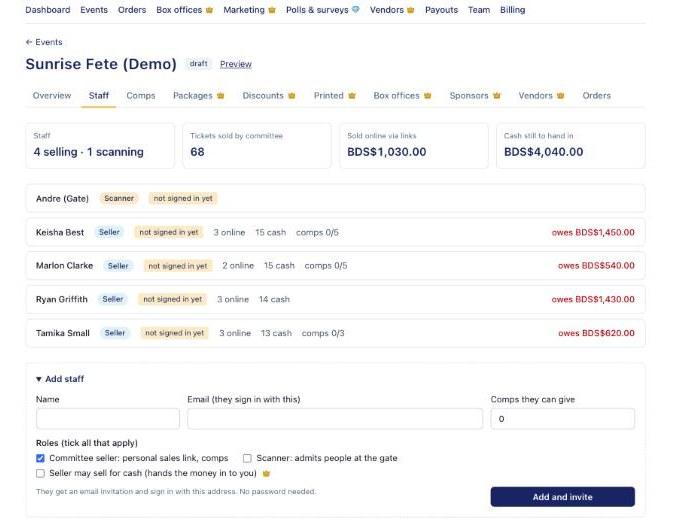
The event Staff tab with committee members 2Online sales through their link
Every seller gets a personal link to the event page. Online sales made through it count towards that seller on the leaderboard.
3Record cash hand-ins
When a seller hands you cash, record it with Record hand-in on the Staff tab or Record payment on the Dashboard's Cash Sales Reconciliation. Each seller shows Settled once everything is handed in.
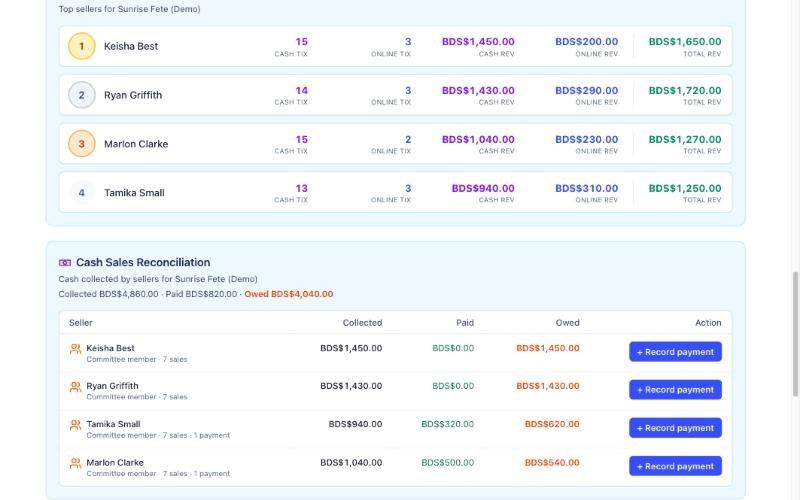
Cash Sales Reconciliation with Record payment buttons
Questions
›What does a committee member cost?
Nothing extra. Committee members and door staff don't use your team seats.
›Who pays the cash ticket fee?
The promoter. Patrons pay nothing extra on cash sales. The fee (2% by default) comes out of your payouts; Billing shows the running total.