
Promoters
Get started as a promoter
Sign up, choose a plan and set up how you get paid.
1Sign up
Go to bajantix.com and choose Sell tickets, then Sign up as a promoter. Enter your name, email and organization name. There is no password: BajanTix emails you a sign-in link and an 8-digit code each time you sign in.
2Choose a plan
Basic covers online sales and the gate scanner. Pro adds committee cash sales, printed tickets and box offices, premium packages, discount codes, sponsors, email marketing and the vendor hub. Running a single event? Buy a Single Event Pass instead of a monthly plan. Plans start with a free trial; change plan any time from Billing.
3Tell us how to pay you
On Billing, under Payouts, add your bank transfer details or PayPal email. BajanTix approves your account before your first payout; after that, payouts follow your plan's schedule (every few days during sales on Pro and Elite).
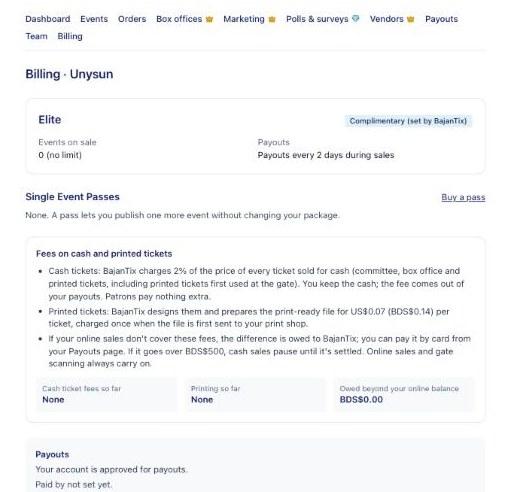
Billing, where you choose your plan and how you are paid 4Invite your team (optional)
Under Team, invite a co-promoter to help run your events. Committee members and door staff are added per event on the event's Staff tab and don't use a team seat.
Questions
›How much does BajanTix cost?
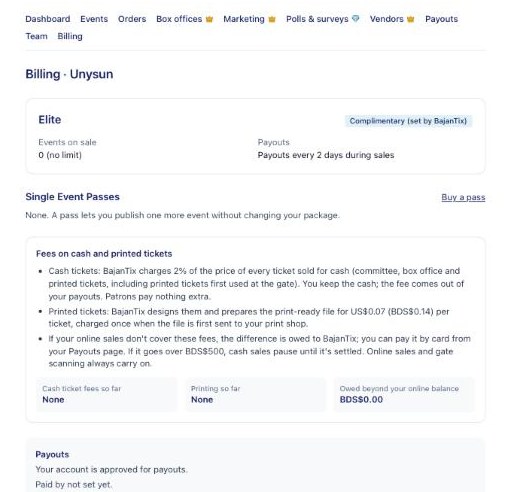
Plans start at US$7.99 a month (shown in BDS). On top of your plan, patrons buying online pay a 2% service fee and a 5.5% platform fee, shown to them as separate lines at checkout. Cash and box office sales carry a small cash ticket fee instead (2% by default), and printed tickets have a printing charge. Billing shows the exact rates on your account.
›Do I need a password?
No. Enter your email on the sign-in page and BajanTix emails you a link and an 8-digit code. Use either one; the link works on any device.
›I used BajanTix before November 2026. Is my data still there?
Yes. Your events, orders, committee, contacts and payouts were moved to the new BajanTix. Sign in with the same email you used before.